Putra Software

Tampilkan postingan dengan label Tools. Tampilkan semua postingan

Download Sp Flashtool v3 Dan v5

Sp Flashtool merupakan singkatan dari "Smart Phone Flash Tool" yang dapat difungsikan sebagai alat Flash Firmware Mediatek, Jauh sebelum itu cara flash ini hanya diperuntuhkan untuk pengguna berpengalaman yang mahir di bidang tersebut

Namun dengan perubahan atas kerja keras pihak pengembang dari Flashtool akhirnya alat ini dapat digunakan oleh pengguna yang memiliki tingkat pengetahuan dasar itu bararti anda tidak membutuhkan Box Flash jika anda ingin mengoperasikan Flash Firmware Mediatek.

Sebagai tambahan, alat ini merupakan salah satu dari bahan yang sangat dibutuhkan sebagai alat flash dengan menggunakan alat tambahan lain seperti firmware, selain itu alat ini sangat ringan dan tidak membebani kinerja komputer anda.

Selanjutnya, alat ini memiliki tampilan yang sederhana sehingga memudahkan anda untuk mengetahui fitur fitur yang terdapat di dalamnya dengan sedikit mengutak atik jika diperlukan untuk sekedar tambahan pengetahuan.

Setelah alat ini di jalankan, anda akan disambut dengan tampilan di bagian atas antara lain File, optoins, window serta help dan di bagian bawahnya terdapat 5 tombol yang memiliki peran dan fungsi masing masing dalam setiap tombol.

Nah, Bagi anda yang ingin melakukan flash Tanpa Box Flash dengan alat ini maka kami sangat rekomendasikan untuk mendownloadnya melalui blog boroa123 flashing, alat ini sengaja kami posting untuk mempermudah pengunjung setia blog ini agar saat melakukan flash telah memiliki satu di antara alat yang dibutuhkan.

Penting untuk saya katakan, saat anda ingin mendownload kami sengaja memasang pemendek url seperti safelink untuk sementara, jadi anda harus melewati link tersebut agar dapat melihat file tersebut dalam format .rar

Disini kami menyimpan file file tersebut di hosting penyimpanan online, disitu terdapat tiga penyimpanan yang berbeda seperti mirrored, userscloud dan google drive. sedangkan untuk mirrodired kami memasang 14 penyimpanan online berbeda tujuannya agar anda lebih mudah untuk menentukan yang mana yang anda sukai.

Berikut ini link download yang sudah tampak sangat jelas anda lihat, pada link pertama kami menempatkan link google drive, pada link yang ke dua dibagian tengah kami tempatkan userscloud dan pada link yang ketiga sekaligus terakhit kami tempatkan di bagian bawah

DOWNLOAD LINK

Google Drive

Userscloud

Mirrored

Download Research Download V.2.9 9015 Plus USB Driver Spreadtrum

Research Download - Saat anda melakukan proses operasi Flashing untuk jenis Ponsel android yang menggunakan CPU Spreadtrum supaya berhasil adalah adanya bahan yang tepat untuk jenis ponsel tersebut, salah satu di antaranya adalah Research Download

Research Download adalah sebuah alat tambahan untuk kebutuhan sebuah operasi Flashing, pada sisi tampilan Research Download memiliki tampilan yang sederhana dan sangat rapi namun berperan penting saat melakukan Flash

Tools ini sangat ringan dan tidak membuat beban terhadap komputer anda dan yang paling penting lagi untuk saya sebutkan dari tools ini adalah ia tidak menempati ruang registry pada komputer atau laptop anda karena ia dikemas dalam bentuk portable


Selain itu tools ini memiliki 4 tombol utama yang mempunyai peran masing masing, tombol pertama mirip seperti roda gigi load packet ia berguna untuk memasukan firmware dan kedua mirip seperti roda gigi juga berguna untuk setting sedangkan tombol ketiga berfungsi untuk memulai proses download sedangkan yang terakhir berfungsi untuk menghentikan proses download

Disini kami sengaja membagikan tidak hanya Research Download V.2.9 9005 saja tetapi kami juga membagikan tools USB Driver Spreadtrum agar pengujung setia blog ini tidak perlu lagi mencari bahan bahan untuk operasi flashing, link download dapat anda lihat di bawah ini

Download Link

Google Drive

Userscloud

Mirror

Download USB Driver Spreadtrum Win 7/8/8.1/10 Plus Langkah Instalasi

Driver USB Spreadtrum Windows 7/8 / 8.1 / 10 - Ini adalah jenis program chipset yang mendukung perangkat seluler Android, Anda dapat menginstal program ini tetapi Anda harus ingat bahwa program ini dapat dijalankan pada Windows 7, 8, 8.1, atau 10.

Program ini sangat penting bagi pengguna Android yang memiliki chipset Spreadtrum, misalnya jika ada masalah yang terkait dengan ponsel Android Anda seperti bootloop, hang dan mati total, maka program ini adalah salah satu alat pendukung dalam melakukan operasi flashing

Jadi, sangat jelas bahwa Driver USB Spreadtrum memiliki peran penting dalam mem-flash, Itu berarti program ini harus ada di PC Anda atau dengan kata lain harus diinstal pada PC atau laptop Anda.

bagi Anda yang sudah mahir atau terbiasa dengan proses instalasi program ini, kami menyediakan tautan unduhan untuk Anda miliki, sehingga ketika Anda melakukan proses flash Anda sudah memiliki salah satu alat ini

Tetapi bagi Anda yang masih pomula dalam hal ini Anda dapat mengikuti beberapa panduan yang telah saya berikan, Plus sebelum Anda menginstal Spreadtrum USB Driver yang satu ini di komputer Anda, pertama-tama pahami proses instalasi.

Langkah intalisasi USB Driver Spreadtrum
  1. Ekstrak dengan menggunakan alat kompresor seperti WinRAR dan instal.
  2. Hubungkan kabel data seluler Anda ke PC.
  3. Pergi ke menu "Device Manager" di komputer Anda dan temukan Driver USB Spreadtrum yang terinstal penuh. lihat gambar
  4. Klik opsi "Action" >>> "Add Legacy Hardware". lihat gambar
  5. Setelah itu Anda akan dibawa ke jendela baru kemudian pilih "Next".lihat gambar
  6. Pada menu selanjutnya, akan ada dua opsi instalasi, yaitu dengan mencari driver otomatis dan manual. Saya sarankan Anda memilih secara manual atau "iinstall the hardware that i manually select from a list (advanced)". Karena jika search auto dipilih, kemungkinan driver tidak ditemukan. lihat gambar
    boroz123 flashing
  7. Setelah itu gambar akan muncul seperti yang ditunjukkan di bawah ini, lalu pilih Show All Device lalu klik Next.lihat gambar
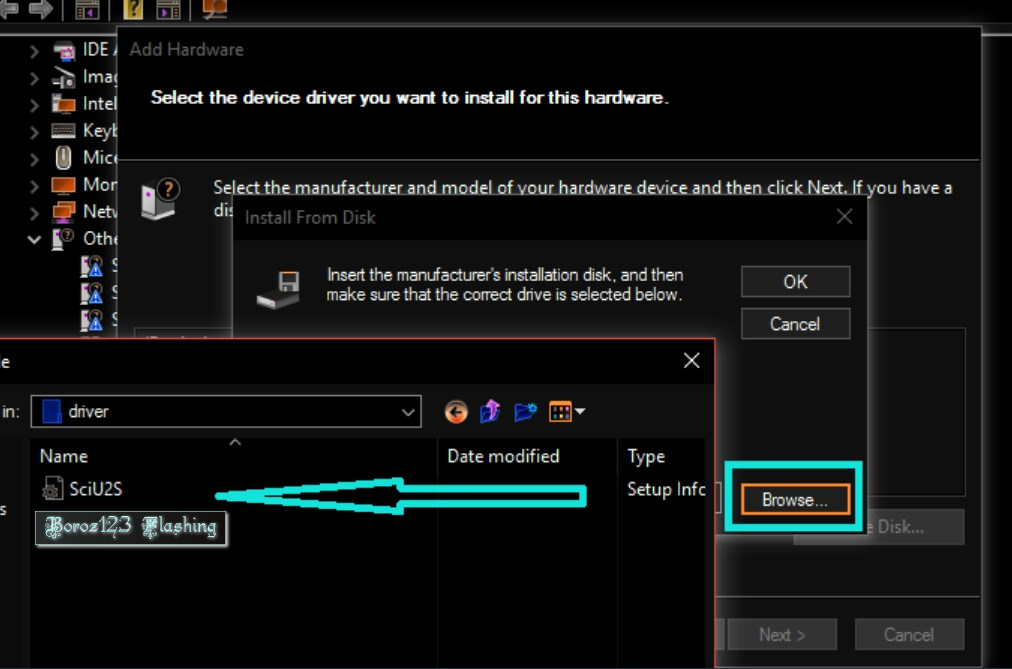
  8. Selanjutnya, pilih Have Disk dan temukan file USB Drive yang telah Anda ekstrak sebelumnya, cari file SCI.
  9. Kemudian pilih Next untuk ke tahap penginstalan, catatan apabila tampil peringatan pilih kotak nomor 2 lihat gambar di bawah ini
  10. Selesai, Setelah proses instalasi selesai dan untuk meyakinkan Anda, Anda dapat pergi ke menu Device Manager, di sana Anda dapat melihat port yang baru saja Anda instal.
Nah, itulah langkah dalam menginstal USB Driver Spreadtrum untuk Windows 7/8 / 8.1 / 10. Saya harap posting ini dapat menambah pengetahuan Anda, Pastikan Anda selalu terus-menerus memeriksa blog kami untuk memastikan bahwa Anda tidak ketinggalan satu pun rilis baru dari kami. sementara untuk tautan unduhan Anda dapat melihat tautan di bawah ini

Download Link

Googledrive
 
Userscloud 

Mirror 

Download Research Download V.2.9 9005 Plus USB Driver Spreadtrum

Research Download - Saat anda melakukan proses operasi Flashing untuk jenis Ponsel android yang menggunakan CPU Spreadtrum supaya berhasil adalah adanya bahan yang tepat untuk jenis ponsel tersebut, salah satu di antaranya adalah Research Download

Research Download adalah sebuah alat tambahan untuk kebutuhan sebuah operasi Flashing, pada sisi tampilan Research Download memiliki tampilan yang sederhana dan sangat rapi namun berperan penting saat melakukan Flash

Tools ini sangat ringan dan tidak membuat beban terhadap komputer anda dan yang paling penting lagi untuk saya sebutkan dari tools ini adalah ia tidak menempati ruang registry pada komputer atau laptop anda karena ia dikemas dalam bentuk portable


Selain itu tools ini memiliki 4 tombol utama yang mempunyai peran masing masing, tombol pertama mirip seperti roda gigi load packet ia berguna untuk memasukan firmware dan kedua mirip seperti roda gigi juga berguna untuk setting sedangkan tombol ketiga berfungsi untuk memulai proses download sedangkan yang terakhir berfungsi untuk menghentikan proses download

Disini kami sengaja membagikan tidak hanya Research Download V.2.9 9005 saja tetapi kami juga membagikan tools USB Driver Spreadtrum agar pengujung setia blog ini tidak perlu lagi mencari bahan bahan untuk operasi flashing, link download dapat anda lihat di bawah ini

Download Link

Google Drive

Userscloud

Mirror

DVDFab 11.0.0.8 Multilingual Full Version

Cadangkan disk Anda, baik itu DVD atau Blu-ray, konversi video dalam mode batch tanpa mengorbankan kualitas, buat dan ripping DVD dengan aplikasi ini

Dikemas dengan set fitur yang mengesankan, DVDFab adalah salah satu salinan DVD teratas dan aplikasi perangkat lunak cadangan yang tersedia di pasar. termasuk konversi DVD dan video, dekripsi Blu-Ray dan kemampuan pemulihan data DVD. Semua ini, bersama dengan fitur pembuatan DVD / Blu-Ray menjadikannya salah satu dari suite pengelolaan DVD yang paling serbaguna yang pernah memenuhi kategorinya.

Suite komprehensif untuk pengelolaan DVD

DVDFab juga memiliki kemampuan untuk mengkompres disk dual-layer ke single-layer; itu membagi judul milik disk dual-layer atau dua lapisan DVD dan memungkinkan untuk membakar gambar ke cakram yang dapat direkam.

Proses instalasi selesai dalam waktu kurang dari satu menit dan membutuhkan restart sistem agar berfungsi dengan baik. Antarmuka DVDFab mudah dimengerti dan dinavigasi; pilihan utama ditampilkan di sisi kiri, sedangkan panel di sebelah kanan disediakan untuk memilih sumber dan target serta pengaturan konversi / penyalinan tambahan.

Salah satu fitur yang paling penting dan dihargai dari DVDFab adalah utilitas salinan DVD, yang memungkinkan Anda untuk menyalin / menyalin / membakar konten DVD ke cakram kosong, sambil mempertahankan kualitas file asli.

Semua konversi video dan alat manajemen yang Anda butuhkan

DVDFab juga menyediakan sarana untuk menyalin DVD ke format video / audio populer, sehingga memungkinkan Anda untuk menyiapkan konten media untuk perangkat seperti iPod, iPad, PS3, atau Xbox.

Aplikasi ini memiliki fitur cukup banyak untuk menangani file Blu-Ray: yang memungkinkan untuk menyalin Blu-Rays ke hard drive Anda (menghapus semua proteksi salinan), ripper yang mengkonversi file ke format yang dapat dimainkan di PS3 / Xbox / iPhone / iPad (Termasuk format 3D), pemutar Blu-Ray to DVD, dan pencipta Blu-Ray.

Selain kemampuan DVD / Blu-Ray terkait, DVDFab juga dilengkapi dengan konverter video yang sangat baik dan cepat, yang memungkinkan Anda untuk mengkonversi hampir semua format video populer ke file yang dapat diputar pada perangkat modern, seperti yang telah disebutkan sebelumnya.

Salah satu salinan DVD dan backup suite terbaik di luar sana

Singkatnya, rangkaian fitur DVDFab mencakup kemampuan yang mengesankan, seperti dekripsi CSS, penghapusan kode wilayah, dukungan format kaya, dan pemulihan DVD. Kualitas file output luar biasa, tidak ada kompromi yang dibuat sama sekali.

Features

  • "DVD Copy" option:
  • 8 DVD to DVD copy mode available: Full Disc, Main Movie, Split, Customize, Customize Split, Clone, Merge and Write Data.
  • Full Disc: All movies, menus and trailers, is copied to a DVD with just one click.
  • Main Movie: Just copy the movie, with specific audio/subpicture.
  • Split: Copy a DVD-9 onto two DVD-5 discs with 100% quality, and preserve original menus on both discs.
  • Ideal for episodic/season DVD movies, TV series, etc.
  • Customize: Personalize your DVDs! Want to make a DVD with only your favorite titles? How about cutting out those annoying commercials? Or selecting specific audio/subpicture? No problem! You can select just your favorite titles, specify the title playback order, with or without original menus, to create a DVD with only the stuff you want!
  • Customize Split: Copy a DVD-9 onto two DVD-5 discs using "Customize" way. Ideal for episode/season DVD.
  • Clone: Make perfect 1:1 bit-to-bit copy of DVDs: Make perfect dual layer DVD copy by using the original layer break position.
  • Copy data DVD disc, like PS2 DVD.
  • Merge: Combine several titles of several sources into one DVD: Combine two DVD-9 like "The Lord of the Rings" into one DVD-9.
  • Merge season DVDs to fewer discs.
  • Create your own special features collection disc.
  • Write Data: Burn existing DVD folder or ISO image file to DVD writer, or convert DVD folder to ISO image file.
  • Very fast copying speed, normally it's about 10 - 20 minutes.
  • Burn to any blank DVD Disc (DVD+R/RW, DVD-R/RW, DVD+R DL, DVD-R DL).
  • Constantly updated to support latest DVD burners and blank DVD discs.
  • "DVD Ripper" option
  • 10 DVD to Mobile copy mode available: Generic, iPod, PSP, ZUNE, NDS, Xbox 360, PS3, Cell Phone, PVP and PDA.
  • More devices support can be added manually.
  • Generic: Convert DVD title to MPEG-4/DivX/XVID/H.264 AVI/MP4 file, which can be played on PC.
  • It also supports all other devices which are not listed in navigation bar.
  • iPod: Convert DVD title to MPEG-4/H.264 MP4 file, which can be played on Apple iPod.
  • PSP: Convert DVD title to MPEG-4/H.264 MP4 file, which can be played on Sony PSP.
  • ZUNE: Convert DVD title to WMV file, which can be played on Microsoft ZUNE.
  • NDS: Convert DVD title to DPG file, which can be played on Nintendo DS.
  • Xbox 360: Convert DVD title to WMV file, which can be played on Microsoft Xbox 360.
  • 8. PS3: Convert DVD title to MPEG-4/H.264 MP4 file, which can be played on Sony Play Station 3.
  • Convert DVD title to specific format which is supported by Cell Phone, PVP (Portable Video Player) and PDA (Personal Digital Assistant).
  • Constantly updated to support more mobile devices.
  • Crop automatically to remove the black bar on many widescreen movies.
  • Allow user to resize output from letterbox to pan&scan.
  • Very fast conversion speed, fully optimized for multi-core system.
  • Support both NTSC and PAL video format.
  • Preview title like real DVD player.
  • Extract DVD audio to MP3/MP4/WMA/WAV/AC3/DTS with "Audio Only" output type.
  • Support up to 5.1 multichannel audio output.
  • "Blu-ray Copy" option
  • 4 Blu-ray to Blu-ray copy modes available: Full Disc, Main Movie, Clone and Write Data.
  • Full Disc: All movies, menus and trailers, is copied to a Blu-ray with just one click.
  • Main Movie: Just copy the movie, with specific audio/subpicture.
  • Clone: Make perfect 1:1 bit-to-bit copy of Blu-ray.
  • Write Data: Burn existing Blu-ray folder or ISO image file to Blu-ray writer, or convert Blu-ray folder to ISO image file.
  • Very fast copying speed.
  • Burn to any blank Blu-ray Disc (BD-R 25, BD-RE 25, BD-R 50, BD-RE 50).
  • Constantly updated to support latest Blu-ray burners and blank Blu-ray discs.
  • Benefits:
  • Remove all known AACS copy protection.
  • Remove all known BD+ copy protection.
  • Remove Region Code, BD-Live and UOPs.
  • Constantly updated to support latest Blu-ray copy protections.
  • Compress BD-50 to single BD-25, BD-9 or BD-5, in "Full Disc" or "Main Movie" mode.
  • Burn to cheap blank DVD Disc (BD-9 and BD-5).
  • Remove HD audio (convert Dolby TrueHD to Dolby AC3, convert DTS-HD Master Audio to DTS) to save space for video when compression is needed.
  • Include internal UDF 2.50 parser to read Blu-ray, no need to install third party driver.
  • Open Blu-ray from disc, ISO image file or folder.
  • Support both NTSC and PAL Blu-ray.
  • Preview title like real Blu-ray player.
  • "Blu-ray Ripper" option
  • 6 Blu-ray to Mobile copy mode available: Xbox 360, PS3, to MKV, to AVI, to MP4 and Audio.
  • More devices support can be added manually.
  • Xbox 360: Convert Blu-ray title to MP4 file, which can be played on Microsoft Xbox 360.
  • PS3: Convert Blu-ray title to MPEG-4/H.264 MP4 file, which can be played on Sony Play Station 3.
  • Convert Blu-ray title to MKV/AVI/MP4 file.
  • Convert Blu-ray audio to MP3/MP4/WMA/WAV/AC3/DTS.
  • Constantly updated to support more mobile devices.
  • Crop automatically to remove the black bar on many widescreen movies.
  • Allow user to resize output from letterbox to pan&scan.
  • Very fast conversion speed, fully optimized for multi-core system.
  • Support both NTSC and PAL video format.
  • Preview title like real Blu-ray player.
  • Support up to 7.1 multichannel audio output.
  • "Video Converter" option
  • Read most popular video formats from Internet, digital camcorders, capture cards, etc. No external codecs needed.
  • 3GP File ( .3gp; 3g2 ), ASF File ( .asf ), AVI File ( .avi; .divx ), FLV File ( .flv ), M2TS File ( .m2ts ), MOV File ( .mov ),
  • MP4 File ( .mp4; .m4v ), MPEG File ( .mpeg; .mpg; .dat ), MKV File ( .mkv ), RMVB File ( .rmvb; .rm ), TS File ( .ts ), VOB File ( .vob ), WMV File ( .wmv ).
  • 10 "File to Mobile" conversion mode available: Generic, iPod, PSP, ZUNE, NDS, Xbox 360, PS3, Cell Phone, PVP and PDA. More devices support can be added manually.
  • Generic: Convert video file to MPEG-4/DivX/XVID/H.264 AVI/MP4 file, which can be played on PC. It also supports other devices which are not listed in navigation bar.
  • iPod: Convert video file to MPEG-4/H.264 MP4 file, which can be played on Apple iPod.
  • PSP: Convert video file to MPEG-4/H.264 MP4 file, which can be played on Sony PSP.
  • ZUNE: Convert video file to WMV file, which can be played on Microsoft ZUNE.
  • NDS: Convert video file to DPG file, which can be played on Nintendo DS.
  • Xbox 360: Convert video file to WMV file, which can be played on Microsoft Xbox 360.
  • PS3: Convert video file to MPEG-4/H.264 MP4 file, which can be played on Sony Play Station 3.
  • Convert video file to specific format which is supported by Cell Phone, PVP (Portable Video Player) and PDA (Personal Digital Assistant).
  • 6 "File to File" conversion mode available: to AVI, to MP4, to WMV, to MKV, to FLV and to 3GP.
  • Convert video file to MPEG-4/DivX/XVID/H.264 AVI/MP4/MKV file, or WMV/FLV/3GP file.
  • Constantly updated to support more mobile devices.
  • Crop automatically to remove the black bar on many widescreen movies.
  • Allow user to resize output from letterbox to pan&scan.
  • Very fast conversion speed, fully optimized for multi-core system.
  • Support full high definition video up to 1080p.
  • Support external subtitle file, and render to video directly.
  • Support both NTSC and PAL video format.
  • Preview video file like real player.
  • Extract audio to MP3/MP4/WMA/WAV/AC3/DTS with "Audio Only" output type.
  • Support up to 5.1 multichannel audio output.
  • "File Transfer" option:
  • Transfer converted files to devices. Currently it supports iPod, PSP and ZUNE, and it will support more devices in the future.

PERSYARATAN SISTEM

  • Pentium II 500 MHz
  • 256 MB RAM (DVD)
  • 10 GB Ruang Hard Disk Free (DVD)
  • Drive DVD-R (W) atau DVD + R (W) (DVD)
  • RAM 512 MB (Blu-ray)
  • 50 GB Ruang Hard Disk Free (Blu-ray)
  • Drive Blu-ray (Blu-ray)
  • Koneksi Internet (Blu-ray) 
HOMEPAGE

DOWNLOAD LINK : DVDFab 11.0.0.8 Multilingual Full Version

Visit my BLOG : keygen-boroz123.xyz


DVDFab 11.0.0.3 (x86/x64) Multilingual Full Version

Cadangkan disk Anda, baik itu DVD atau Blu-ray, konversi video dalam mode batch tanpa mengorbankan kualitas, buat dan ripping DVD dengan aplikasi ini

Dikemas dengan set fitur yang mengesankan, DVDFab adalah salah satu salinan DVD teratas dan aplikasi perangkat lunak cadangan yang tersedia di pasar. Sorotan termasuk konversi DVD dan video, dekripsi Blu-Ray dan kemampuan pemulihan data DVD. Semua ini, bersama dengan fitur pembuatan DVD / Blu-Ray menjadikannya salah satu dari suite pengelolaan DVD yang paling serbaguna yang pernah memenuhi kategorinya.
Suite komprehensif untuk pengelolaan DVD

DVDFab juga memiliki kemampuan untuk mengkompres disk dual-layer ke single-layer; itu membagi judul milik disk dual-layer atau dua lapisan DVD dan memungkinkan untuk membakar gambar ke cakram yang dapat direkam.

Proses instalasi selesai dalam waktu kurang dari satu menit dan membutuhkan restart sistem agar berfungsi dengan baik. Antarmuka DVDFab mudah dimengerti dan dinavigasi; pilihan utama ditampilkan di sisi kiri, sedangkan panel di sebelah kanan disediakan untuk memilih sumber dan target serta pengaturan konversi / penyalinan tambahan.

Salah satu fitur yang paling penting dan dihargai dari DVDFab adalah utilitas salinan DVD, yang memungkinkan Anda untuk menyalin / menyalin / membakar konten DVD ke cakram kosong, sambil mempertahankan kualitas file asli.
Semua konversi video dan alat manajemen yang Anda butuhkan

DVDFab juga menyediakan sarana untuk menyalin DVD ke format video / audio populer, sehingga memungkinkan Anda untuk menyiapkan konten media untuk perangkat seperti iPod, iPad, PS3, atau Xbox.

Aplikasi ini memiliki fitur cukup banyak untuk menangani file Blu-Ray: yang memungkinkan untuk menyalin Blu-Rays ke hard drive Anda (menghapus semua proteksi salinan), ripper yang mengkonversi file ke format yang dapat dimainkan di PS3 / Xbox / iPhone / iPad (Termasuk format 3D), pemutar Blu-Ray to DVD, dan pencipta Blu-Ray.

Selain kemampuan DVD / Blu-Ray terkait, DVDFab juga dilengkapi dengan konverter video yang sangat baik dan cepat, yang memungkinkan Anda untuk mengkonversi hampir semua format video populer ke file yang dapat diputar pada perangkat modern, seperti yang telah disebutkan sebelumnya.
Salah satu salinan DVD dan backup suite terbaik di luar sana

Singkatnya, rangkaian fitur DVDFab mencakup kemampuan yang mengesankan, seperti dekripsi CSS, penghapusan kode wilayah, dukungan format kaya, dan pemulihan DVD. Kualitas file output luar biasa, tidak ada kompromi yang dibuat sama sekali.


Features

  • "DVD Copy" option:
  • 8 DVD to DVD copy mode available: Full Disc, Main Movie, Split, Customize, Customize Split, Clone, Merge and Write Data.
  • Full Disc: All movies, menus and trailers, is copied to a DVD with just one click.
  • Main Movie: Just copy the movie, with specific audio/subpicture.
  • Split: Copy a DVD-9 onto two DVD-5 discs with 100% quality, and preserve original menus on both discs.
  • Ideal for episodic/season DVD movies, TV series, etc.
  • Customize: Personalize your DVDs! Want to make a DVD with only your favorite titles? How about cutting out those annoying commercials? Or selecting specific audio/subpicture? No problem! You can select just your favorite titles, specify the title playback order, with or without original menus, to create a DVD with only the stuff you want!
  • Customize Split: Copy a DVD-9 onto two DVD-5 discs using "Customize" way. Ideal for episode/season DVD.
  • Clone: Make perfect 1:1 bit-to-bit copy of DVDs: Make perfect dual layer DVD copy by using the original layer break position.
  • Copy data DVD disc, like PS2 DVD.
  • Merge: Combine several titles of several sources into one DVD: Combine two DVD-9 like "The Lord of the Rings" into one DVD-9.
  • Merge season DVDs to fewer discs.
  • Create your own special features collection disc.
  • Write Data: Burn existing DVD folder or ISO image file to DVD writer, or convert DVD folder to ISO image file.
  • Very fast copying speed, normally it's about 10 - 20 minutes.
  • Burn to any blank DVD Disc (DVD+R/RW, DVD-R/RW, DVD+R DL, DVD-R DL).
  • Constantly updated to support latest DVD burners and blank DVD discs.
  • "DVD Ripper" option
  • 10 DVD to Mobile copy mode available: Generic, iPod, PSP, ZUNE, NDS, Xbox 360, PS3, Cell Phone, PVP and PDA.
  • More devices support can be added manually.
  • Generic: Convert DVD title to MPEG-4/DivX/XVID/H.264 AVI/MP4 file, which can be played on PC.
  • It also supports all other devices which are not listed in navigation bar.
  • iPod: Convert DVD title to MPEG-4/H.264 MP4 file, which can be played on Apple iPod.
  • PSP: Convert DVD title to MPEG-4/H.264 MP4 file, which can be played on Sony PSP.
  • ZUNE: Convert DVD title to WMV file, which can be played on Microsoft ZUNE.
  • NDS: Convert DVD title to DPG file, which can be played on Nintendo DS.
  • Xbox 360: Convert DVD title to WMV file, which can be played on Microsoft Xbox 360.
  • 8. PS3: Convert DVD title to MPEG-4/H.264 MP4 file, which can be played on Sony Play Station 3.
  • Convert DVD title to specific format which is supported by Cell Phone, PVP (Portable Video Player) and PDA (Personal Digital Assistant).
  • Constantly updated to support more mobile devices.
  • Crop automatically to remove the black bar on many widescreen movies.
  • Allow user to resize output from letterbox to pan&scan.
  • Very fast conversion speed, fully optimized for multi-core system.
  • Support both NTSC and PAL video format.
  • Preview title like real DVD player.
  • Extract DVD audio to MP3/MP4/WMA/WAV/AC3/DTS with "Audio Only" output type.
  • Support up to 5.1 multichannel audio output.
  • "Blu-ray Copy" option
  • 4 Blu-ray to Blu-ray copy modes available: Full Disc, Main Movie, Clone and Write Data.
  • Full Disc: All movies, menus and trailers, is copied to a Blu-ray with just one click.
  • Main Movie: Just copy the movie, with specific audio/subpicture.
  • Clone: Make perfect 1:1 bit-to-bit copy of Blu-ray.
  • Write Data: Burn existing Blu-ray folder or ISO image file to Blu-ray writer, or convert Blu-ray folder to ISO image file.
  • Very fast copying speed.
  • Burn to any blank Blu-ray Disc (BD-R 25, BD-RE 25, BD-R 50, BD-RE 50).
  • Constantly updated to support latest Blu-ray burners and blank Blu-ray discs.
  • Benefits:
  • Remove all known AACS copy protection.
  • Remove all known BD+ copy protection.
  • Remove Region Code, BD-Live and UOPs.
  • Constantly updated to support latest Blu-ray copy protections.
  • Compress BD-50 to single BD-25, BD-9 or BD-5, in "Full Disc" or "Main Movie" mode.
  • Burn to cheap blank DVD Disc (BD-9 and BD-5).
  • Remove HD audio (convert Dolby TrueHD to Dolby AC3, convert DTS-HD Master Audio to DTS) to save space for video when compression is needed.
  • Include internal UDF 2.50 parser to read Blu-ray, no need to install third party driver.
  • Open Blu-ray from disc, ISO image file or folder.
  • Support both NTSC and PAL Blu-ray.
  • Preview title like real Blu-ray player.
  • "Blu-ray Ripper" option
  • 6 Blu-ray to Mobile copy mode available: Xbox 360, PS3, to MKV, to AVI, to MP4 and Audio.
  • More devices support can be added manually.
  • Xbox 360: Convert Blu-ray title to MP4 file, which can be played on Microsoft Xbox 360.
  • PS3: Convert Blu-ray title to MPEG-4/H.264 MP4 file, which can be played on Sony Play Station 3.
  • Convert Blu-ray title to MKV/AVI/MP4 file.
  • Convert Blu-ray audio to MP3/MP4/WMA/WAV/AC3/DTS.
  • Constantly updated to support more mobile devices.
  • Crop automatically to remove the black bar on many widescreen movies.
  • Allow user to resize output from letterbox to pan&scan.
  • Very fast conversion speed, fully optimized for multi-core system.
  • Support both NTSC and PAL video format.
  • Preview title like real Blu-ray player.
  • Support up to 7.1 multichannel audio output.
  • "Video Converter" option
  • Read most popular video formats from Internet, digital camcorders, capture cards, etc. No external codecs needed.
  • 3GP File ( .3gp; 3g2 ), ASF File ( .asf ), AVI File ( .avi; .divx ), FLV File ( .flv ), M2TS File ( .m2ts ), MOV File ( .mov ),
  • MP4 File ( .mp4; .m4v ), MPEG File ( .mpeg; .mpg; .dat ), MKV File ( .mkv ), RMVB File ( .rmvb; .rm ), TS File ( .ts ), VOB File ( .vob ), WMV File ( .wmv ).
  • 10 "File to Mobile" conversion mode available: Generic, iPod, PSP, ZUNE, NDS, Xbox 360, PS3, Cell Phone, PVP and PDA. More devices support can be added manually.
  • Generic: Convert video file to MPEG-4/DivX/XVID/H.264 AVI/MP4 file, which can be played on PC. It also supports other devices which are not listed in navigation bar.
  • iPod: Convert video file to MPEG-4/H.264 MP4 file, which can be played on Apple iPod.
  • PSP: Convert video file to MPEG-4/H.264 MP4 file, which can be played on Sony PSP.
  • ZUNE: Convert video file to WMV file, which can be played on Microsoft ZUNE.
  • NDS: Convert video file to DPG file, which can be played on Nintendo DS.
  • Xbox 360: Convert video file to WMV file, which can be played on Microsoft Xbox 360.
  • PS3: Convert video file to MPEG-4/H.264 MP4 file, which can be played on Sony Play Station 3.
  • Convert video file to specific format which is supported by Cell Phone, PVP (Portable Video Player) and PDA (Personal Digital Assistant).
  • 6 "File to File" conversion mode available: to AVI, to MP4, to WMV, to MKV, to FLV and to 3GP.
  • Convert video file to MPEG-4/DivX/XVID/H.264 AVI/MP4/MKV file, or WMV/FLV/3GP file.
  • Constantly updated to support more mobile devices.
  • Crop automatically to remove the black bar on many widescreen movies.
  • Allow user to resize output from letterbox to pan&scan.
  • Very fast conversion speed, fully optimized for multi-core system.
  • Support full high definition video up to 1080p.
  • Support external subtitle file, and render to video directly.
  • Support both NTSC and PAL video format.
  • Preview video file like real player.
  • Extract audio to MP3/MP4/WMA/WAV/AC3/DTS with "Audio Only" output type.
  • Support up to 5.1 multichannel audio output.
  • "File Transfer" option:
  • Transfer converted files to devices. Currently it supports iPod, PSP and ZUNE, and it will support more devices in the future.

PERSYARATAN SISTEM

  • Pentium II 500 MHz
  • 256 MB RAM (DVD)
  • 10 GB Ruang Hard Disk Free (DVD)
  • Drive DVD-R (W) atau DVD + R (W) (DVD)
  • RAM 512 MB (Blu-ray)
  • 50 GB Ruang Hard Disk Free (Blu-ray)
  • Drive Blu-ray (Blu-ray)
  • Koneksi Internet (Blu-ray) 
HOMEPAGE

DOWNLOAD LINK : DVDFab 11.0.0.3 Full Version ||| Mirror Link

Visit my BLOG : keygen-boroz123.xyz